
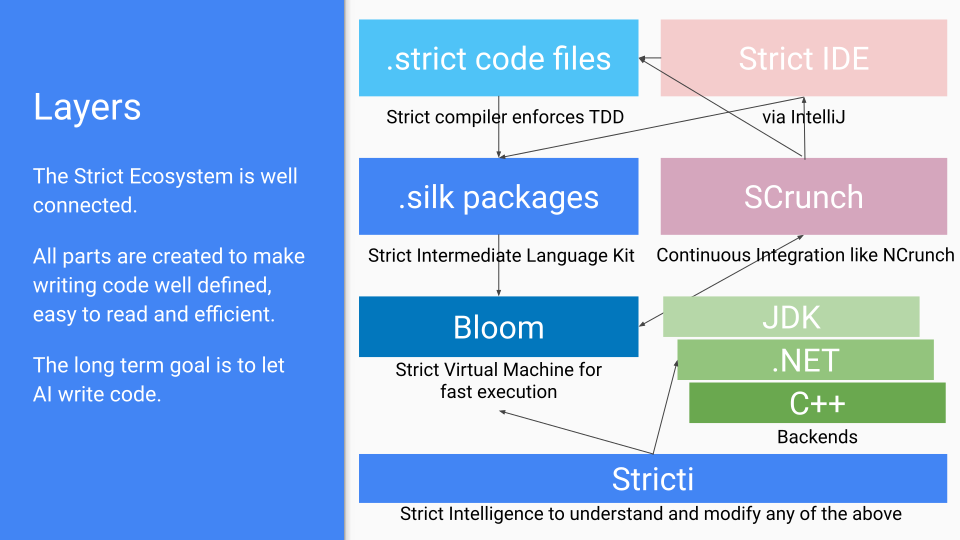
Strict is a simple-to-understand programming language that not only humans can read and understand, but also computers are able to understand, modify and write it.
The long-term goal is NOT to create just another programming language, but use Strict as the foundation for a higher level language for computers to understand and write code. This is the first step towards a future where computers can write their own code, which is the ultimate goal of Strict. Again, this is very different from other programming languages that are designed for humans to write code but not for computers to understand it. Even though LLMs can be trained to repeat and imitate, which is amazing to see, they still don't understand anything really and make the most ridiculous mistakes on any project bigger than a handful of files.) Strict needs to be very fast, both in execution and writing code (much faster than any existing system), so millions of lines of code can be thought of by computers and be evaluated in real time (seconds).
The LSP (Language Server Protocol) implementation here adds support for VSCode, VS2019, IntelliJ and many more IDEs as possible Editors for Strict.
| Layer | Responsibility | When It Runs | Rejects / Optimises |
|---|---|---|---|
| Strict.Language | Load .strict files, package handling, core type parsing (structure only) | File load | Bad formatting & package errors |
| Strict.Expressions | Lazy-parse method bodies into an immutable tree of if, for, assignments, calls… |
First method call | Structural/semantic violations |
| Strict.Validators | Visitor-based static analysis & constant folding | After expression parsing | Impossible casts, unused mutables, foldable constants |
| Strict.Runtime | Execute expression tree via ~40 instructions | On demand by the caller | Value/type errors, side-effects |
| Strict.TestRunner | Run in-code tests (method must start with a test) |
First call to a method | Failing test expressions |
| Strict.Optimizers | Strip passed tests & other provably dead code | After first successful run | Dead instructions, test artefacts |
- Parses package headers and type signatures only.
- Keeps every package cached in memory for instant access.
- Any malformed file is rejected before deeper compilation.
- Method bodies are parsed lazily the first time they’re needed.
- Produces an immutable expression tree — never mutated at runtime.
- Early structural checks ensure only valid Strict constructs survive.
- Runs constant folding & simple propagation (e.g.
"5" to Number → 5). - Flags impossible casts (
"abc" to Number) and other static mistakes. - Separation of concerns: validation without touching runtime state.
- The Runtime is the single source of truth for dynamic behaviour.
- Executes ~40 byte-code-like instructions as statements, all in memory for now.
- Very fast, the goal is to run this in Strict itself and go through millions of lines per second.
- Every method must open with a self-contained test.
- Tests are executed once; passing expressions become
trueand are pruned. - Guarantees that only verified code reaches production.
- Final clean-up pass: Remove passed test code.
- Eliminate unused variables created solely for testing.
- Preserve original line numbers for precise error reporting.
Note: There are older projects like the VS Code LanguageServer, Cuda Compiler, Roslyn, Grammar, etc. but these are no the focus here, we just want to get the Runtime working, switch all the code to Strict itself and let it rip then ^^
-
Immutable Expression Tree Static analysis only; no runtime state sneaks in.
-
Validation Before Execution Catch the trivial stuff early, let the Runtime handle the hard parts.
-
Runtime Is King Only the VM sees real values and side-effects — optimisation happens post-execution.
-
One-Time Tests Tests live where the code lives, run once, then disappear.
Only needed code that is actually called is ever parsed, validated, tested and runs in the Runtime. This is a very different approach and allows generating millions of .strict lines of code and discarding anything that is not needed or doesn't work pretty much immediatly.
- Fast Feedback — formatting and type errors fail instantly, long before runtime.
- Deterministic Builds — immutable trees + one canonical code style = no drift.
- Lean Runtime — by the time code hits the Runtime, dead weight is already gone.
Happy coding with Strict — where there’s exactly one way to do it right.
	3 + 4 is 7
	2 is not 3
	5 to Text is "5"
	123.digits is (1, 2, 3)
	5 to Text is "5"
	2.4.Floor is 2
	"Hey" + " " + "you" is "Hey you"
	"Your age is " + 18 is "Your age is 18"
	"5" to Number is 5
	"A" is "A"
	"hi" is not in "hello there"
	"lo" is in "hello there"
	"hello".StartsWith("hel")
	"hello".StartsWith("hel", 1) is false
	"yo mama".StartsWith("mama") is false
	"abc".Count("a") is 1
	"Hi".SurroundWithParentheses is "(Hi)"
	"1, 2, 3".SurroundWithParentheses is "(1, 2, 3)"
List.strict usage (all lists are simply surrounded by brackets, basically any method call uses a list as the arguments)
	(1, 2) to Text is "(1, 2)"
	(1, 2).Length is 2
	(1, 2) is (1, 2)
	(1, 2, 3) is not (1, 2)
	(1, 2, 3) + (4, 5) is (1, 2, 3, 4, 5)
	("Hello", "World") + (1, 2) is ("Hello", "World", "1", "2")
	("1", "2") + (3, 4) is ("1", "2", "3", "4")
	("1", "2") to Numbers + (3, 4) is (1, 2, 3, 4)
	("3", "4") + (1, 2) to Text is ("3", "4", "(1, 2)")
	("3", "4") + (1, 2) to Texts is ("3", "4", "1", "2")
	(1 + 2) * 3 is not 1 + 2 * 3
	(("1", "2") + (3, 4)) to Numbers is (1, 2, 3, 4)
	3 + (4) is (3, 4)
	(1) + ("Hi") is Error("Cannot downcast Texts to fit to Numbers")
	(1, 2, 3) + 4 is (1, 2, 3, 4)
	("Hello", "World") + 5 is ("Hello", "World", "5")
	(1, 2, 3) - (3) is (1, 2)
	(1, 2, 3) - 3 is (1, 2)
	(1, 2, 3) - 4 is (1, 2, 3)
	(2, 4, 6) / (2) is (1, 2, 3)
	(1, 2) / (2, 4) is (0.5, 0.5)
	(1) / (20, 10) is (0.05, 0.1)
	(2, 4, 6) / 2 is (1, 2, 3)
	(1, 2) * (3, 5) is (3, 10)
	(1, 2) * 3 is (3, 6)
	(1, 2, 3).Sum is 6
	(1, 2, 3).X is 1
	(1, 2).Y is 2
	(1, 2, 3).Z is 3
	(1, 2, 3, 4).W is 4
	(1, 2, 3).First is 1
	(1, 2, 3).Last is 3
	3 is in (1, 2, 3)
	3 is not in (1, 2)
	"b" is in ("a", "b", "c")
	"d" is not in ("a", "b", "c")
	(1, 2, 3).Index(2) is 1
	(1, 2, 3).Index(9) is -1
	(1, 2, 3).Remove(2) is (1, 3)
	(1, 2).Count(1) is 1
	(1, 3).Count(2) is 0
	("Hi", "Hello", "Hi").Count("Hi") is 2
The only iterator in Strict is the "for" expression, it is usually used to enumerate through lists, but anything that implements Iterator can be enumerated (Enum, List, Number, Range and anything that implements List like Dictionary). The syntax for "for" is quite powerful and not much like c-style languages, it is more like functional languages. A for loop is also usually the only spot where mutable variables are used and make sense, so a lot of optimizations are done here to avoid actual mutable usage at runtime and thus allowing almost all code to be executed without side effects and in parallel. Remember that you don't have to write any parallel code, threads, processes, async, etc. it is all done automatically be the runtime and way more powerful than any other programming language could provide. All of the following examples are automatically executed in parallel and even on the GPU if available and if it would be faster to do so.
Unlike the above examples or any other code in strict for expressions are not as self explanatory, so each use case is explained here in a bit more detail.
has logger
...
	constant someList = (1, 2, 3)
	for someList
  	logger.Log(index + ": " + value)
Outputs this into the logger (defaults to the console): 0: 1 1: 2 2: 3
The for expression requires an iterator to go through each element, which is what someList is. There is no need to specify an enumerator index or value as this is done automatically and you can access these via "index" (0, 1, 2, 3, etc.) and "value" (whatever value is at this index). If you need to access the outer value you can type "outer.value".
You can iterate over a number if you just want a quick for loop for lets say 10 iterations. This outputs 10 lines starting from 0 to 9, index and value are identical here:
  for 10
    logger.Log(value)
Iterating over a Range will start at the Range.Start and end before the Range.ExclusiveEnd is reached. This outputs 2, 3, 4 into 3 lines:
	for Range(2, 5)
  	logger.Log(value)
Or you can enumerate over Enum values, lets say you have Connection.strict (if there are only constants in a type, it is an enum, you don't have to give them values, but here they are all Text values)
constant Google = "https://google.com",
constant Microsoft = "https://microsoft.com"
Now we can iterate over this:
for Connection
  logger.Log(value)
Notice that iterating over an Enum value is something else, if the Enum is a number, it will just iterate to that number like in the above example "for 10". If the Enum value is a Text string, it will iterate over each letter as Text is just a List of Character.
for Connection.Google
  logger.Log(value)
has logger
LogNumbers
	for element in (1, 2, 3, 4)
		logger.Log(element)
Outputs 1 to 4 in 4 lines. Index still can be used, but value wasn't used or overwritten, so you can access the outer value this way. A more complex example would be:
for x in Range(1, 10)
  for y in Range(1, 10)
    logger.Log((x, y))
which would output 100 values starting at (0, 0) ending at (10, 10). Notice that Strict will evaluate the fastest execution, so for image processing it is not needed to iterate y first. Here it makes no difference. Since output logging is a side effect this can't be executed fully in parallel (the logger will still get all values at once, but in order and output them at once as pretty much no time will have passed from start to finish).
For dictionaries you might want to use index, key and value variables, but again: you don't have to. This works fine:
for someDictionary
  if value.Key is "Apple"
    return value.Value
Dictionaries are just Lists of key+value pairs, so each enumeration just returns one of these pairs and we can grab the first value as the key with value(0), which is exactly what value.Key will do. Same goes for value(1) for value.Value.
Index(other Generic) Number
	(1, 2, 3).Index(2) is 1
	(1, 2, 3).Index(9) is -1
	for elements
		if value is other
			return index
	-1
Unlike the for examples below that use a more compact syntax, here we want to manually abort the for loop iteration when an element is found. Since the list is not sorted by the other value we search for here, we have to iterate the whole elements list and then abort when we found the value. With the index method we are interested in the index of that value, so that is what is returned here (or -1 if nothing is found).
If you look at the source code of Dictionary.strict you might be confused how simple it is, all the optimizations happen at runtime, the code in Strict.Base just shows how the types are functionally working. At runtime everything is optimized. That is also why there are no other collections needed yet, no Stack, LinkedList, Queue, SortedDictionary, HashTable, whatever. You can just use List and Dictionary as is and at runtime Strict will figure out what internal structure makes most sense based on how it is used. This of course means if you mix and match different types like using a queue or stack, but also randomly adding or removing elements in the middle, it can't be as fast. The biggest impact on optimizations is if mutable types are used or not, by default nothing should be mutable in strict (and most mutables can be removed in the Executor so code stays functional and fast), but sometimes you might want to handcraft a mutable iteration like for image processing. If Strict can figure out that your input image stays unchanged and your output is just assigned back to the input, it can remove all mutable automatically and just swap two images (double buffering).
has brightness Number
Process(mutable image ColorImage) ColorImage
	mutable testImage = ColorImage(Size(1, 1), (Color(0, 1, 2)))
	AdjustBrightness(0).Process(testImage) is ColorImage(Size(1, 1), (Color(0, 1, 2)))
	AdjustBrightness(5).Process(testImage) is ColorImage(Size(1, 1), (Color(5, 6, 7)))
	if brightness is 0
		return image
	for row, column in image.Size
		GetBrightnessAdjustedColor(image.Colors(column * image.Size.Width + row))
GetBrightnessAdjustedColor(currentColor Color) Color
	AdjustBrightness(0).GetBrightnessAdjustedColor(Color(0, 1, 2)) is Color(0, 1, 2)
	AdjustBrightness(5).GetBrightnessAdjustedColor(Color(0, 0, 0)) is Color(5, 5, 5)
	AdjustBrightness(-5).GetBrightnessAdjustedColor(Color(0, 0, 0)) is Color(0, 0, 0)
	Color((currentColor.Red + brightness).Clamp(0, 255),
	(currentColor.Green + brightness).Clamp(0, 255),
	(currentColor.Blue + brightness).Clamp(0, 255))
If the iterator is multidimensional like Size, it can be used in a for loop and multiple variables can be named (value would here be a list of 2 values like for Dictionary):
has Width Number with value > 0
has Height Number with value > 0
for Iterator(Vector2)
	for x in Range(0, Width)
	for y in Range(0, Height)
		Vector2(x, y)
...
Notice that Size(0, 0) or Size(-1, 5) would not be valid as all dimensions must be positive numbers as defined above. The iterator is also returning a Vector2, which is just a list with 2 numbers.
You might already have noticed that for loops can be used as the return value for a method. In the Vector2.for implementation we just have 2 for loops and inside just the Vector2(x, y) is constructed. The method however returns an Iterator(Vector2) which is used in the image processing example to iterate through all possible pixel values of an image.
Here a few more examples as this is used in most useful for loops
in(key Generic) Boolean
	2 is in Dictionary((1, 1), (2, 2))
	3 is not in Dictionary((1, 1), (2, 2))
	for keysAndValues
		value.Key is key
Here the dictionary with keysAndValues is iterated. On each iteration the for body is executed, which here is just a comparision if the value.Key is the given key value. If that evaluation is true, the for loop is aborted and true is returned (we found the key). If the whole loop finishes and no key was found, the whole for expression returns false. In strict the last line in a method is always automatically the return expression. "return" is only needed when it happens in any line above it.
GetElementsText Text
	(1, 3).GetElementsText is "1, 3"
	for elements
		(index is 0 ? "" else ", ") + value
This method goes through the elements and does a quick check if we are at the first element via "index is 0", if yes, then an empty Text string is used, else ", " is used. Then that value is concatenated via "+ value", where value is the current value from the for enumeration. The result of the for body expression is a Text (either just the value as Text for the first iteration or ", " + value otherwise). The same way for expression boolean value was used in the previous example, this Text value is now used to create a new list (since we didn't specify + at the beginning of the for expression, see below for more examples). So the return value of the for expression is a list of Text, which is not what we asked for, we wanted a Text, so Strict automatically concatenates the list into a single Text value, which is then returned.
Length Number
	(1, 2).Length is 2
	for elements
		1
The same concept can be used to count up some numbers, here the for expression results in a number 1 for each iteration. The for expression returns a list of numbers, all 1, which is then concatenated into the Length Number that we wanted to know.
Sum and Count work the same way, see if you can figure it out:
Sum Generic
	(1, 2, 3).Sum is 6
	for elements
		value
Count(searchFor Generic) Number
	(1, 2).Count(1) is 1
	(1, 3).Count(2) is 0
	("Hi", "Hello", "Hi").Count("Hi") is 2
	for elements
		if value is searchFor
			1
You can of course also use any other operator instead of the default creation of a list and concatentation. The above Sum method would return the same value if it were written as:
Sum Generic
	for elements
		+ value
However, Strict is VERY picky and strict (hence the name) on how to do things and would immediately replace it with the easier above version (as it needs less code).
But maybe you want to do some other operation in the for body, like multiplying:
Product Generic
	for elements
		* value
As you can see this is more like a pipe operator in functional languages (Lisp, Clojure, F#, Haskell, etc.). Let's say we want to do some filtering, mapping and reducing. Let's look at some different languages, all of them pretty much do the same thing, the syntax is just slightly different:
C#
int[] numList = { 0, 1, 2, 3, 4, 5, 6, 7, 8, 9 };
int result =
    numList
        .Where(n => n % 2 == 0)
        .Select(n => n * 10)
        .Sum();
Haskell
numList :: [Int]
numList = [0..9]
result :: Int
result =
    sum
      . map (* 10)
      . filter even
      $ numList
Clojure
(def num-list [0 1 2 3 4 5 6 7 8 9])
(def result
  (->> num-list
       (filter even?)
       (map #(* 10 %))
       (reduce + 0)))
F#
let numList = [| 0..9 |]
let result =
    numList
    |> Array.filter (fun n -> n % 2 = 0)
    |> Array.map (fun n -> n * 10)
    |> Array.sum
Javascript
const numList = [0, 1, 2, 3, 4, 5, 6, 7, 8, 9];
const result = numList
    .filter(n => n % 2 === 0)
    .map(n => n * 10)
    .reduce((acc, n) => acc + n, 0);
Python
num_list = [0, 1, 2, 3, 4, 5, 6, 7, 8, 9]
result = sum(n * 10 for n in num_list if n % 2 == 0)
The python example is a bit more compact, but you have to get used to the syntax as it does the mapping first and the filtering last, unlike all other examples.
Here is the same example in Strict (creates a list of numbers, which is then concatenated automatically for us using List.Sum or the identical output via + concatenation as in the example above):
for Range(0, 10)
  if value % 2
    value * 10
Let's look at a more complex example (not really useful, but is shows how we can append more things to for enumerations), think in similar terms to the functional examples above.
  for numbers
		to Text
		Length * Length
		if value > 3
			4 + value * 3
			to Text
Here we start iterating through a list of numbers, then we convert each value to Text (value is always used by default on any call, no matter if we are in a method were it defaults to our type instance or in a for loop, where it is the current iteration value).Then we use Length on the new value inside the for body, which is now a Text, so that would be the length of that Text and multiply it by itself. That length is a number again, the if expression now checks if that value is above 3. If so we go into the inner if body and do a quick calculation and finally we convert the resulting number to Text, which is then added to the for expression result. If the return value is a List of Text that would be returned, if it is a Text, then everything is concatenated. Otherwise an error is given with the incompatible type. Also note that some of these things could be done in one line like (value to Text).Length * (value to Text).Length, but that would be longer and is not prefered. (4 + value * 3) to Text is probably slightly shorter and would be prefered, but the point here is you can call whatever code you like to transform any Iterator.
Here is the final example from Strict.Examples/RemoveParentheses.strict
Remove Text
	RemoveParentheses("example(unwanted thing)example").Remove is "exampleexample"
	mutable parentheses = 0
	for text
		if value is "("
			parentheses = parentheses + 1
		else if value is ")"
			parentheses = parentheses - 1
		else if parentheses is 0
			value
Details at https://strict-lang.org/blog
The idea to write my (Benjamin Nitschke, now CEO of Delta Engine) own programming language originally started in the 1990s after reading my favorite book "Gödel, Escher, Bach" by Douglass R. Hofstadter as a child. Due to lack of time and experience, it wasn't really much more than a bunch of small programs and proof of concept ideas. In 2008–2010 the first iteration was built, and while it worked, it lacked integration and was discarded in favor of Lua. This repository was started 2020-06-16 just for experimentation to create editor plugins and rethinking some of the low-level parsing, using the old Strict sdk as a guide. In mid 2025 I am back working on it alone after a few years of pause while I had some help in 2020–2022 from some employees, in the end the parent project was abandoned. There wasn't a need for creating neural networks and doing image processing with this. There were too many ready-to-use solutions to compete against, and the project ran out of funding and man power.
Now it is just a project to work a little on in the evenings and weekends if I find the time for it. I will continue to the original goal of creating a base layer language computers can actually understand and work on top of. I am thinking more in the way DNA and proteins are the base building blocks of life, but day to day we don't really think about them that much.